
Hello everyone!
We made a server on an app called "Discord" to practice OET speaking roleplays together (doctors only, sorry!)
Why Discord?
- It has everything you need for speaking practice in a single place! you can ask questions, answer questions, browse through the data and roleplay cards, and practice with others, all without leaving the app. (unlike Zoom for example)
- There are multiple voice channels. So even if 100 people want to practice at the same time, they can split into groups and practice. No one would have to wait for their turn.
- You can decide when you want to practice. As there are many members in our server, you can open the app whenever you're ready and see who else is free to practice and start a session!
How to join:
- Download the app, either from Play Store or from the official website: www.discord.com
- Create an account.
- Join our server by clicking on this link: https://discord.gg/apm455V
How to use the app:
- After joining the server, you'll see the chat screen, which looks like this.
In this screen, you can type a message saying that you're free to practice now, and see who else is available, then join a room (a voice channel) together.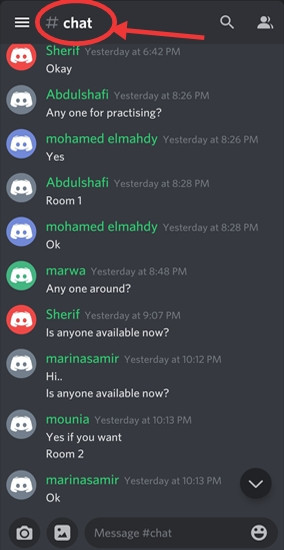
- If you swipe to the left, you'll see the channels screen, which looks like this.
Here, you can see some text channels and voice channels.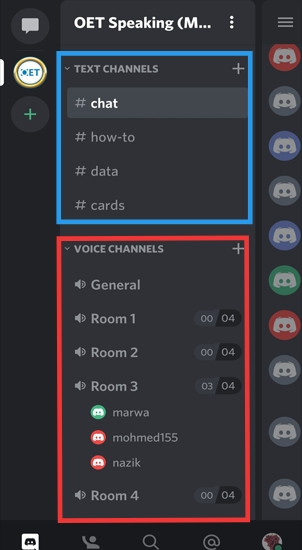
The text channels:
1. #chat: Here you can ask if there's anyone free to practice now, as I explained earlier.
2. #how-to: Here you'll find solutions to the problems you might face using discord.
3. #data: In this channel, you'll find the preparation material for the speaking subtest. Some of the videos here are in Arabic, that's because this server was initially made for Arabic speakers. If you have any other useful material, you can send them to me and I'll add them to the list.
4. #cards: This channel contains about 80 roleplay cards arranged according to their scenario (e.g. reluctant patient, breaking bad news, etc). If you scroll down, you'll find an index which should help you find the scenario you want to practice directly without having to scroll through all the cards.
The voice channels:
Remember when you asked in the chat channel if there's anyone free to practice now? Well, these are the rooms where you can talk to each other. So you decide which room you want to practice in (whichever is empty!), join it, and start your practice session!
Each room has only 4 spaces, so if more than 4 people want to practice at the same time, they'll have to split up and join different rooms.
Edit: We have increased the limit of participants in the first two rooms to 8 instead of 4, as some people prefer having larger sessions.
Now, I suggest that every session consists of only 3 participants, one is the doctor, the second is the interlocutor, and the third observes the conversation without participating in it. After you finish a card, both the interlocutor and the observer give their feedback to the doctor then switch roles. This way you'll practice more, have feedback from 2 people and leave the 4th space in the room empty, so if there's anyone who's not prepared to practice yet, they can join and listen only.


The Females' Section:
If you scroll down in the channels screen, you'll find a section for females only. It looks like this.

So if you are a female, and you want to practice only with females, you can use this section for that.
If you have any questions, feel free to contact me!
Good luck!