
Introduction
If your emails suddenly stop reaching inboxes, there’s a high chance you’ve landed on an email blocklist. An email blocklist is a database that flags IPs or domains suspected of sending spam, causing your emails to be rejected or pushed straight to the spam folder. This can seriously damage your email deliverability, hurt your brand reputation, and reduce your marketing ROI. In this guide, we’ll walk you through proven email blocklist removal strategies that actually work in 2026.
Key Takeaways
- Email blocklists directly impact your deliverability, reputation, and revenue
- Most blocklisting happens due to poor email practices like high bounce rates and lack of authentication
- Always fix the root cause before requesting removal to avoid getting relisted
- Proper SPF, DKIM, and DMARC setup is essential for trust and inbox placement
- Gradual IP/domain warmup helps rebuild sender reputation after removal
- Dedicated IPs provide better control over email performance
- Continuous monitoring using tools like MXToolbox and Google Postmaster is critical
- Email blocklist removal is not a one-time fix—it requires ongoing optimization
Table of Contents
- Introduction
- What is an Email Blocklist?
- Common Reasons for Getting Blocklisted
- How to Check If You Are Blocklisted
- Email Blocklist Removal Strategies That Actually Work
- Tools for Email Deliverability & Blocklist Monitoring
- Conclusion
What is an Email Blocklist?
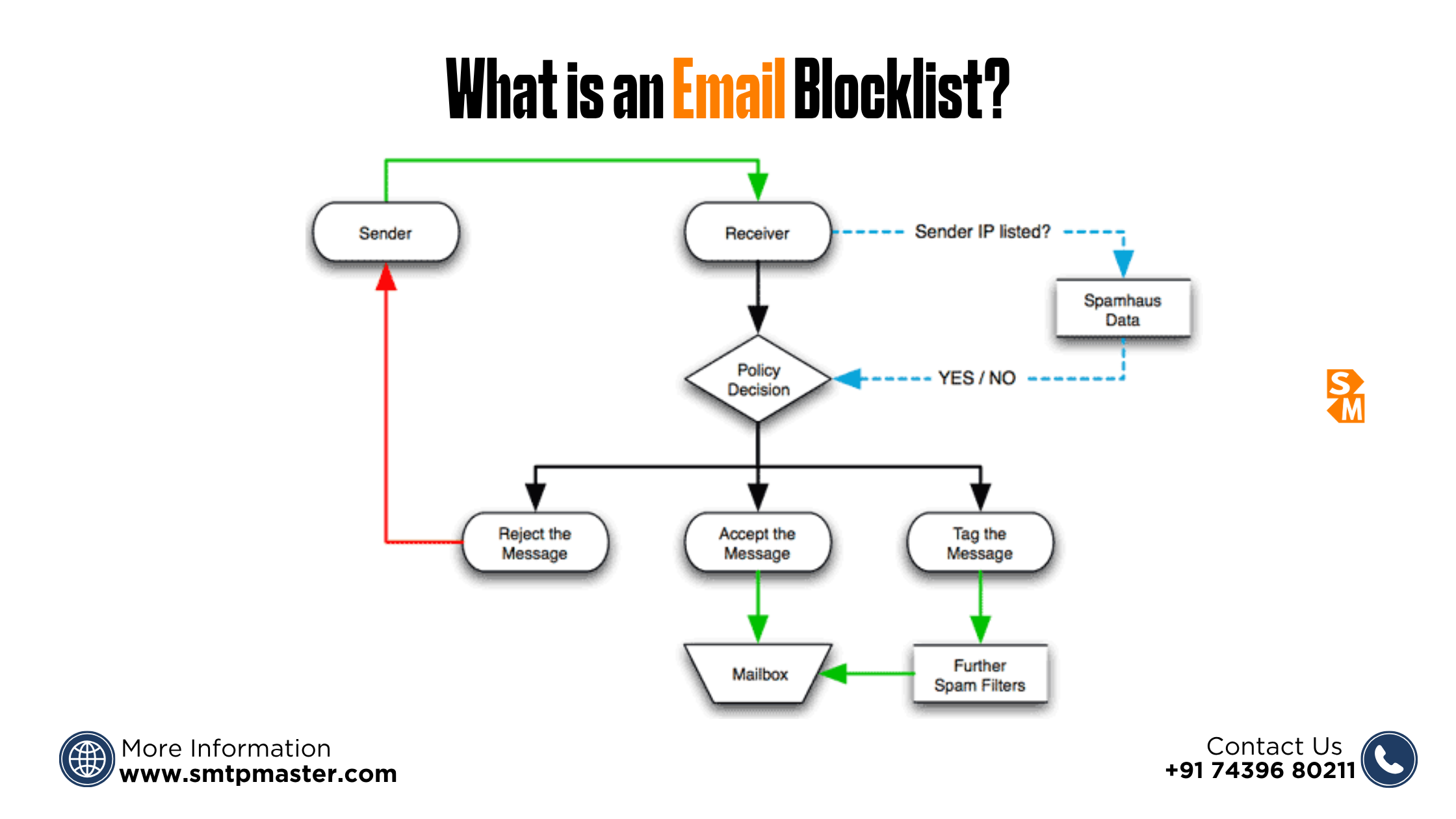
An email blocklist is a real-time database that identifies IP addresses and domains suspected of sending spam or malicious emails. Email providers like Gmail, Outlook, and Yahoo use these blocklists to filter incoming messages and protect users from unwanted content. There are mainly two types of blocklists: IP-based blocklists, which flag the sending server’s IP, and domain-based blocklists, which target specific domains. Popular examples include Spamhaus and Barracuda, both widely used by ISPs to decide whether your emails reach the inbox or get blocked.
Common Reasons for Getting Blocklisted
- Sending emails without proper authentication (missing SPF, DKIM, DMARC), which signals low trust to ISPs
- High bounce rates caused by invalid or outdated email lists
- Frequent spam complaints from recipients marking your emails as unwanted
- Sudden spikes in email volume without proper IP warmup
- Poor email content using spam trigger words or misleading subject lines
- Not providing a clear unsubscribe option, violating email best practices
- Using shared IPs with bad sender reputation
How to Check If You Are Blocklisted
- Use tools like MXToolbox, Spamhaus lookup, and multi-RBL checkers to scan your status
- Check both your sending IP and domain reputation for any listings
- Review email logs and bounce messages for blocklist-related errors or rejection codes
- Look for warning signs such as emails not being delivered or landing in spam
- Notice sudden drops in open rates or engagement, which often indicate deliverability issues
Regular monitoring helps you quickly detect and act on any blocklist problems before they impact your campaigns further.
Email Blocklist Removal Strategies That Actually Work
Identify the Blocklist Source
- Check which blocklist your IP or domain is listed on
- Use lookup tools to detect the exact listing
- Understand the reason behind the listing before taking action
Fix the Root Cause First
- Clean your email list by removing invalid and inactive contacts
- Properly configure SPF, DKIM, and DMARC authentication
- Reduce spam complaints by sending relevant and permission-based emails
- Improve sending patterns
Request Delisting Properly
- Go to the blocklist provider's official website.
- Submit a delisting request with a clear explanation
- Be honest, technical, and mention the fixes you implemented
- Follow their guidelines to increase approval chances
Warm Up Your IP & Domain Again
- Gradually increase your email sending volume
- Start by sending emails to highly engaged users
- Use email warmup tools to rebuild sender reputation
- Monitor performance metrics during the warmup phase
Switch to Dedicated IP (If Needed)
- Avoid using shared IPs with poor reputation
- For improved control, switch to a dedicated IP
- Use a clean and reliable email infrastructure for long-term stability
Tools for Email Deliverability & Blocklist Monitoring
- MXToolbox – Check blocklist status and DNS records
- Google Postmaster Tools – Monitor domain reputation and spam rates
- Talos Intelligence – Analyze IP reputation and trust score
- GlockApps – Test inbox placement and spam filtering
- SMTP monitoring tools – Track delivery, bounces, and server performance
Conclusion
Getting removed from a blocklist is a big step, but it’s not the finish line. If the root issues aren’t fixed, the problem can come back quickly. Think of it as building a healthy email system—clean lists, proper setup, and smart sending habits matter every day. Stay consistent, monitor your email reputation regularly, and use reliable tools or services to keep your emails landing where they should—in the inbox, not the spam folder.
FAQs
How long does email blocklist removal take?
It can take anywhere from a few hours to several days depending on the blocklist provider and issue severity.
Can I remove my IP from Spamhaus?
Yes, you can request removal from Spamhaus after fixing the root cause through their official delisting process.
What is the fastest way to fix email blocklist issues?
The fastest way is to identify the cause, fix it immediately, and submit a proper delisting request.