
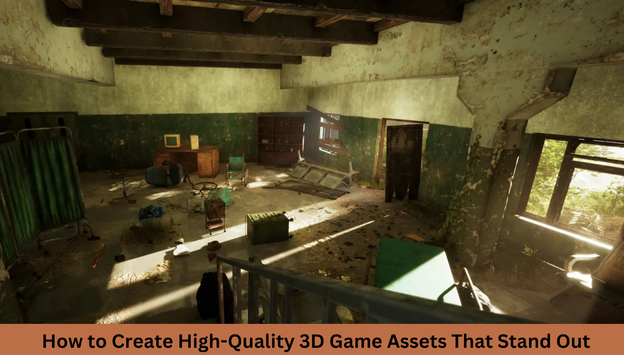
Creating immersive 3D game environments is an exciting and rewarding process that brings digital worlds to life. Whether you’re dreaming of crafting breathtaking landscapes or designing intricate 3D game assets, mastering the basics of 3D environment modeling is the first step.
In this guide, we’ll cover the essential concepts, tools, and techniques that beginners need to build stunning 3D game environments. From 3D modeling games to hard surface modeling, you’ll gain the knowledge needed to start your journey in game design.
1. Understanding 3D Game Environments
A 3D game environment is the virtual world where a game takes place. It includes terrains, buildings, vegetation, lighting, and objects that make the setting believable. Game environments can range from realistic cityscapes to fantasy realms.
2. Why 3D Environments Matter in Games
A well-designed 3D game environment enhances player immersion, tells a story, and creates a unique atmosphere. Game worlds are not just backdrops; they actively contribute to gameplay and player experience.
Getting Started with 3D Environment Modeling
3. Choosing the Right Software for 3D Modeling Games
Before creating your first 3D game environment, you need the right tools. Here are some of the most popular software options:
-
Blender – Free and open-source, ideal for beginners.
-
Maya – Industry-standard with powerful features.
-
3ds Max – Great for environment and 3D hard surface modeling.
-
ZBrush – Best for sculpting organic assets.
4. Learning the Basics of 3D Game Assets
3D game assets are the objects that populate a game world, including props, buildings, vehicles, and characters. These assets are created using techniques such as:
-
Polygonal modeling – The most common technique for creating game assets.
-
Sculpting – Used for organic shapes and high-detail models.
-
Procedural modeling – Generates assets using algorithms.
Core Techniques in 3D Environment Modeling
5. Hard Surface Modeling for Game Environments
Hard Surface Modeling is used to create objects with sharp edges and mechanical details, such as buildings, vehicles, and machinery. Mastering 3D hard surface modeling is crucial for designing realistic environments.
6. Creating a Car 3D Model for Your Game
Vehicles are an important part of many game worlds. 3D vehicle modeling requires attention to proportion, structure, and detail. Here’s a simple workflow for making a car 3D model:
-
Block out the basic shape.
-
Refine the edges and add details.
-
Apply textures and materials.
-
Optimize for real-time performance.
7. Props 3D Model Design: Bringing Environments to Life
Props like barrels, crates, streetlights, and furniture add realism to your 3D game environment. When creating a props 3D model, consider:
-
Scale and proportion – Ensure assets fit naturally in the world.
-
Texture details – Use high-quality textures for realism.
-
Optimization – Reduce polygon count to improve performance.
Texturing and Materials in 3D Game Environments
8. The Importance of Texturing in 3D Game Assets
Texturing is what makes 3D game assets look realistic. It involves applying images (textures) to models to give them color, patterns, and depth. Techniques include:
-
UV mapping – Unwrapping a model’s surface to apply a 2D texture.
-
Normal mapping – Simulating surface details without increasing geometry.
-
PBR (Physically Based Rendering) – Creating realistic materials based on light interaction.
9. Choosing the Right Materials for Realistic Environments
Materials define how an object interacts with light. In 3D game environments, you’ll work with materials like:
-
Metal – Used for weapons, machinery, and vehicles.
-
Wood – Ideal for props, furniture, and buildings.
-
Glass – Common in modern urban settings.
Lighting and Rendering in 3D Game Environments
10. How Lighting Affects 3D Environments
Lighting is crucial in game design because it sets the mood and directs the player’s focus. Common lighting techniques include:
-
Ambient lighting – Provides general illumination.
-
Directional lighting – Mimics sunlight.
-
Point lighting – Used for localized light sources like lamps.
11. Rendering Your 3D Game Environment
Rendering is the process of generating the final visual output of your 3D game environment. Game engines like Unreal Engine and Unity allow real-time rendering, ensuring smooth gameplay performance.
Optimizing 3D Game Environments for Performance
12. Reducing Polygon Count in 3D Models
Performance is a key factor in game development. High-poly models can slow down a game, so optimization techniques like LOD (Level of Detail) modeling are essential.
13. Using Baking Techniques to Enhance Detail
Baking allows you to transfer high-detail information from a detailed model to a low-poly version. This is especially useful in 3D hard surface modeling and 3D vehicle modeling.
Bringing Your 3D Game Environment to Life
14. Implementing Your 3D Models in a Game Engine
Once your 3D game assets are ready, import them into a game engine like:
-
Unreal Engine – Best for high-quality rendering.
-
Unity – Great for indie developers.
-
Godot – A free and lightweight option.
15. Testing and Improving Your 3D Game Environment
The final step is to test your environment for visual appeal, performance, and gameplay functionality. Iterate and refine until you achieve the desired result.
Conclusion
Mastering 3D game environments takes time and practice, but with the right tools and techniques, anyone can create stunning virtual worlds. Whether you’re designing a car 3D model, building complex landscapes, or crafting a props 3D model, every step in the process contributes to a more immersive gaming experience.
By focusing on 3D environment modeling, optimizing assets, and leveraging lighting techniques, you’ll be well on your way to becoming a skilled 3D modeling games artist. Keep experimenting, learning, and pushing the boundaries of your creativity!
FAQs
1. What software is best for 3D game environment modeling?
Blender, Maya, 3ds Max, and ZBrush are popular choices, each offering unique advantages for modeling, sculpting, and texturing.
2. How can I optimize my 3D game assets for performance?
Reduce polygon count, use normal maps, bake details, and implement LOD (Level of Detail) techniques to improve performance.
3. What is the difference between organic modeling and hard surface modeling?
Organic modeling is used for natural forms like characters and plants, while hard surface modeling is for mechanical objects like buildings and vehicles.
4. How do I make a realistic car 3D model?
Start with basic blocking, refine shapes, apply detailed textures, and optimize for real-time rendering in a game engine.
5. What are PBR materials, and why are they important?
PBR (Physically Based Rendering) materials simulate real-world lighting interactions, making game environments look more realistic.
Now, get out there and start creating your dream 3D game environments! 🚀