
In the modern digital landscape, ensuring that all users can easily access and interact with online content is a fundamental responsibility for web developers, designers, and business owners. A key component of an inclusive digital experience is accessible navigation. This concept goes beyond aesthetics and functionality—it ensures that websites are usable by people of all abilities, including those with disabilities.
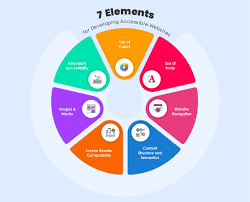
What Is Accessible Navigation?
Accessible navigation refers to the design and implementation of website navigation systems that are usable by everyone, including individuals who rely on assistive technologies such as screen readers, keyboard navigation, or voice controls. This includes menus, links, buttons, and any other interactive elements that help users move through a website.
A well-structured navigation system helps users understand where they are on a site, how to move to other sections, and what actions they can take. Without accessible navigation, users with disabilities may find it difficult—or even impossible—to engage with a site’s content, which can lead to frustration and exclusion.
Why It Matters
There are several compelling reasons why accessible navigation should be a top priority:
-
Inclusivity: It ensures equal access for users with visual, auditory, motor, or cognitive impairments.
-
Legal Compliance: Many countries, including the U.S. and members of the EU, have laws requiring digital accessibility.
-
Improved Usability: A site that's easy to navigate benefits all users, not just those with disabilities.
-
Better SEO: Search engines favor websites with clear, structured navigation, which can improve rankings.
Key Features of Accessible Navigation
Creating accessible navigation involves implementing several design and development best practices, many of which are outlined in the Web Content Accessibility Guidelines (WCAG). Here are some key features:
1. Keyboard Accessibility
All navigational elements should be operable using a keyboard alone. This is essential for users who cannot use a mouse due to physical disabilities.
2. Skip Navigation Links
Skip links allow users to bypass repetitive content (like navigation bars) and jump directly to the main content. This saves time and effort for screen reader and keyboard users.
3. Logical Tab Order
Ensure that users can tab through the site in a logical order that matches the visual layout. Unexpected tab sequences can be confusing and frustrating.
4. Clear and Descriptive Labels
Navigation links and buttons should have clear, descriptive labels. Avoid vague terms like "Click here" in favor of more meaningful text like "View Accessibility Services."
5. Responsive and Flexible Menus
Menus should work seamlessly across devices and assistive technologies. Dropdowns and mega-menus must be coded to expand and collapse with keyboard commands and be readable by screen readers.
Conclusion
Accessible navigation is a critical aspect of designing websites that welcome all users. It improves usability, supports legal compliance, and enhances overall user satisfaction. As more people rely on digital tools for everything from shopping to learning, ensuring your website’s navigation is accessible is not just good practice—it’s the right thing to do.
By prioritizing accessibility in your site’s navigation, you're not only expanding your audience but also making a powerful statement about your commitment to inclusivity and universal design.