
It is fairly easy to make gui's with FLTK if you follow the tutorials on the web and/or use FLUID but it is quite hard for beginners to get the widgets in a gui to talk to one-another. About the only place where anyone tries to explain it is in a tutorial by Robert Arkiletian here (http://arkiletian.com/fltk-tutorial/) which gives different ways of doing it. The recommended way is quite complicated because it sets up classes as well as public and private methods and uses extra inline functions, etc, which all works well (indeed I followed it religiously for my first project) but I was interested in finding a slightly more minimal way of doing the same thing in the hope that I might be able to understand it a bit better! Satisfying my natural stupidity is the primary driver here, of course, rather than bluffing it all from the web, or AI ! !
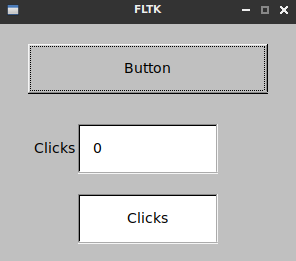
The example shown here counts the number of times a button is clicked and sends the result to a text output window and a progress bar. The plain text code is below:
#include <FL/Fl.H>
#include <FL/Fl_Window.H>
#include <FL/Fl_Output.H>
#include <FL/Fl_Button.H>
#include <FL/Fl_Progress.H>

Fl_Window* window; //Make the widgets global by declaring them all here.
Fl_Button* button;
Fl_Output* output;
Fl_Progress* progress;

int clicks=0;
char *counter = (char*)malloc(10);

void whenPushed(Fl_Widget *w) {
clicks+=1;
sprintf(counter, "%4d", clicks);
printf("%s\n",counter);
output->value(counter);
progress->value(clicks); }

int main(int argc, char **argv) { //Don't declare the widgets here.
  window = new Fl_Window(300,240);
  button = new Fl_Button(30,20,240,50,"Button");
  output = new Fl_Output (80, 100, 140, 50, "Clicks");
  progress = new Fl_Progress (80, 170, 140, 50, "Clicks");

  sprintf(counter, "%4d", clicks);
  output->value(counter);
  progress->value(clicks);

  button->callback(whenPushed);

  window->end();
  window->show(argc, argv);
  return Fl::run();
}
and a prettified version (from https://hilite.me/) is here:
#include <FL/Fl.H>
#include <FL/Fl_Window.H>
#include <FL/Fl_Output.H>
#include <FL/Fl_Button.H>
#include <FL/Fl_Progress.H>

Fl_Window* window; //Make the widgets global by declaring them all here.
Fl_Button* button;
Fl_Output* output;
Fl_Progress* progress;

int clicks=0;
char *counter = (char*)malloc(10);

void whenPushed(Fl_Widget *w) {
clicks+=1;
sprintf(counter, "%4d", clicks);
printf("%s\n",counter);
output->value(counter);
progress->value(clicks); }

int main(int argc, char **argv) { //Don't declare the widgets here.
  window = new Fl_Window(300,240);
  button = new Fl_Button(30,20,240,50,"Button");
  output = new Fl_Output (80, 100, 140, 50, "Clicks");
  progress = new Fl_Progress (80, 170, 140, 50, "Clicks");

  sprintf(counter, "%4d", clicks);
  output->value(counter);
  progress->value(clicks);

  button->callback(whenPushed);

  window->end();
  window->show(argc, argv);
  return Fl::run();
}
The key thing is to declare all the widgets at the top so that they have global scope (I think) and not to declare them later on in main() or elsewhere since the callback function will not be able to see them if you do this. Hence, in the main() function, if I was to say:
Fl_Output* button = new Fl_Button(30,20,240,50,"Button");
rather than just:
button = new Fl_Button(30,20,240,50,"Button");
it would all come crashing down at run time and our best laid plans would be in complete ruin.
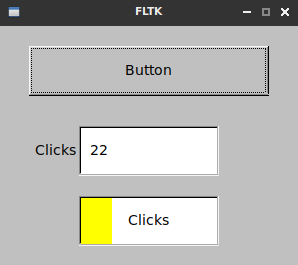
It does seem to work OK with a fairly minimal amount of extra code so I do hope this helps. The problem is that all the people who know about FLTK are too expert in C/C++ to explain it well enough for complete beginners to understand.
Going even more minimal
I then found out that one can get the program to work by just making the widgets that need to be updated by the callback function (i.e. the output window and the progress bar) global. Here is the corresponding code.
#include <FL/Fl.H>
#include <FL/Fl_Window.H>
#include <FL/Fl_Output.H>
#include <FL/Fl_Button.H>
#include <FL/Fl_Progress.H>

Fl_Output* output;   //Make the output widgets global by declaring them here.
Fl_Progress* progress;

int clicks=0;
char *counter = (char*)malloc(10);

void whenPushed(Fl_Widget *w) {
clicks+=1;
sprintf(counter, "%4d", clicks);
printf("%s\n",counter);
output->value(counter);
progress->value(clicks); }

int main() {
  Fl_Window* window = new Fl_Window(300,240);
  Fl_Button* button = new Fl_Button(30,20,240,50,"Button");
  output = new Fl_Output (80, 100, 140, 50, "Clicks");   //These are already declared as Fl_widgets.
  progress = new Fl_Progress (80, 170, 140, 50, "Clicks");

  sprintf(counter, "%4d", clicks);
  output->value(counter);
  progress->value(clicks);

  button->callback(whenPushed);

  window->end();
  window->show();
  return Fl::run();
}
The ultimate plan might be to use classes, etc, but its looking too complicated for the moment.
Putting callbacks after main()
If you find it a bit ugly having the callbacks above main(), which is required in order to get the above program to compile, you can declare them along with the global variables and then place the functions wherever you want.
#include <FL/Fl.H>
#include <FL/Fl_Window.H>
#include <FL/Fl_Output.H>
#include <FL/Fl_Button.H>
#include <FL/Fl_Progress.H>

Fl_Output* output;   //Make the output widgets global by declaring them here.
Fl_Progress* progress;
int clicks=0;
char *counter = (char*)malloc(10);
void whenPushed(Fl_Widget *w);  // Declare a global callback

int main() {
  Fl_Window* window = new Fl_Window(300,240);
  Fl_Button* button = new Fl_Button(30,20,240,50,"Button");
  output = new Fl_Output (80, 100, 140, 50, "Clicks");   //These are already declared as Fl_widgets.
  progress = new Fl_Progress (80, 170, 140, 50, "Clicks");

  sprintf(counter, "%4d", clicks);
  output->value(counter);
  progress->value(clicks);

  button->callback(whenPushed);

  window->end();
  window->show();
  return Fl::run();
}

void whenPushed(Fl_Widget *w) {
clicks+=1;
sprintf(counter, "%4d", clicks);
printf("%s\n",counter);
output->value(counter);
progress->value(clicks); }
Its cosmetics really, but I think it might be a bit neater.
Going mega-minimal
There was some plain stupid repetition in the above examples, so cutting this out gives the following.
#include <FL/Fl.H>
#include <FL/Fl_Window.H>
#include <FL/Fl_Output.H>
#include <FL/Fl_Button.H>
#include <FL/Fl_Progress.H>
#include <cstdlib>

Fl_Output* output;   //Make the output widgets global by declaring them here.
Fl_Progress* progress;
int clicks=0;
char *counter = (char*)malloc(10);
void whenPushed(Fl_Widget *w);  // Declare a global callback

int main() {
  Fl_Window* window = new Fl_Window(300,240);
  Fl_Button* button = new Fl_Button(30,20,240,50,"Button");
  output = new Fl_Output (80, 100, 140, 50, "Clicks");   //These are already declared as Fl_widgets.
  progress = new Fl_Progress (80, 170, 140, 50, "Clicks");
  button->callback(whenPushed);
  window->end();
  window->show();
  return Fl::run();
}

void whenPushed(Fl_Widget *w) {
clicks+=1;
sprintf(counter, "%4d", clicks);
printf("%s\n",counter);
output->value(counter);
progress->value(clicks); }