
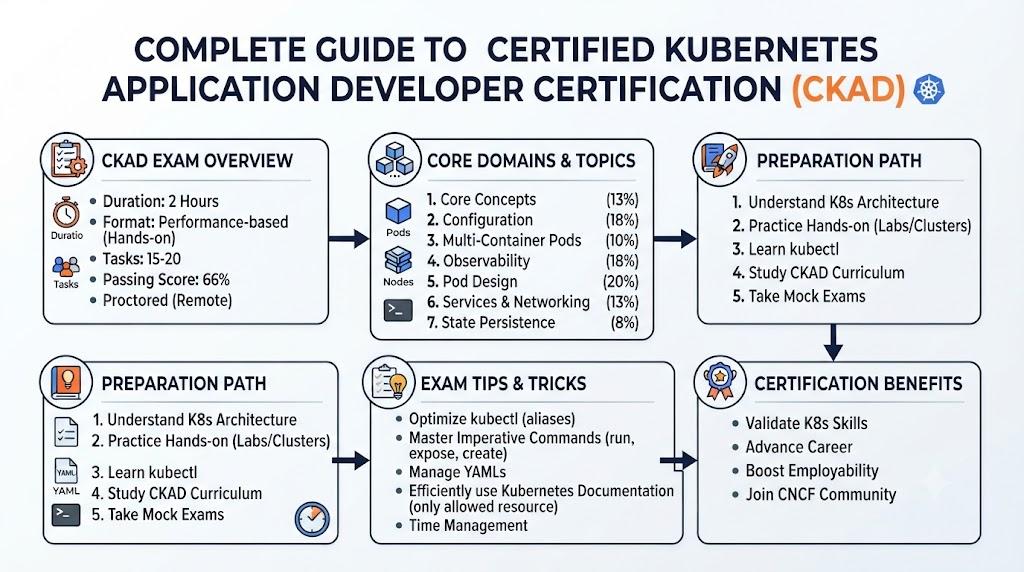
The Certified Kubernetes Application Developer certification is designed for engineers, developers, DevOps professionals, and technical managers who want to build, deploy, manage, and troubleshoot applications on Kubernetes with confidence.As modern companies move from traditional servers to containers and cloud-native platforms, Kubernetes has become one of the most important skills for software teams. This certification helps professionals prove that they understand Kubernetes application concepts, workloads, deployments, services, configuration, storage, security basics, and troubleshooting.
What Is Certified Kubernetes Application Developer?
The Certified Kubernetes Application Developer certification focuses on the practical skills needed to design, deploy, and manage applications inside Kubernetes environments.
It helps learners understand how Kubernetes works from an application developer’s point of view. Instead of only learning theory, the certification prepares professionals to work with real Kubernetes objects such as Pods, Deployments, Services, ConfigMaps, Secrets, Volumes, Namespaces, and application troubleshooting.
In simple words, this certification proves that you can work with applications running on Kubernetes.
Why Kubernetes Skills Matter Today
Kubernetes is now widely used by startups, enterprises, IT service companies, product companies, banks, telecom firms, healthcare platforms, SaaS businesses, and cloud-native teams.
Earlier, developers only needed to write code and hand it over to operations teams. Today, software engineers are expected to understand how their applications are packaged, deployed, scaled, monitored, and recovered.
This is where Kubernetes becomes important.
A developer who understands Kubernetes can work better with DevOps teams, reduce deployment issues, improve application reliability, and support faster release cycles.
For managers, Kubernetes knowledge helps in planning cloud-native projects, hiring skilled engineers, reducing infrastructure risk, and improving delivery timelines.
Who Should Take Certified Kubernetes Application Developer?
This certification is suitable for professionals who want to work closely with Kubernetes-based application delivery.
It is useful for:
- Software Engineers
- Backend Developers
- Full Stack Developers
- DevOps Engineers
- Cloud Engineers
- Platform Engineers
- Site Reliability Engineers
- Technical Leads
- Engineering Managers
- Release Engineers
- Automation Engineers
- Freshers with basic Linux and container knowledge
Software engineers who are already working with Docker, microservices, CI/CD, cloud platforms, or application deployment will find this certification very useful.
Managers and team leads can also take this certification to understand how Kubernetes fits into modern software delivery.
Certified Kubernetes Application Developer Certification Overview
Skills You’ll Gain
After preparing for the Certified Kubernetes Application Developer certification, you should gain practical skills in several important areas.
You will learn how to:
- Understand Kubernetes architecture from an application point of view
- Create and manage Pods
- Deploy applications using Deployments
- Use Services for application access
- Work with ConfigMaps and Secrets
- Manage application configuration safely
- Use Labels and Selectors effectively
- Work with Namespaces
- Understand container lifecycle inside Kubernetes
- Configure environment variables
- Use Volumes for application data
- Scale applications
- Perform rolling updates and rollbacks
- Troubleshoot failed Pods and application errors
- Read Kubernetes logs
- Use basic
kubectlcommands confidently - Understand how Kubernetes supports modern DevOps workflows
These skills are useful not only for certification but also for real project work.
Real-World Projects You Should Be Able to Do After It
After completing this certification preparation, you should be able to work on practical Kubernetes projects such as:
- Deploying a web application on Kubernetes
- Creating a multi-container application setup
- Exposing an application using Kubernetes Service
- Managing application configuration with ConfigMaps
- Storing sensitive values using Secrets
- Scaling an application based on demand
- Updating application versions using rolling deployment
- Rolling back a failed deployment
- Troubleshooting CrashLoopBackOff errors
- Debugging failed Pods using logs and describe commands
- Creating isolated environments using Namespaces
- Deploying a microservice-based application
- Connecting frontend and backend services inside Kubernetes
- Preparing basic Kubernetes YAML files for application teams
These are the kinds of tasks engineers often face in real projects.
Core Topics Covered in Certified Kubernetes Application Developer
Kubernetes Basics
You should understand what Kubernetes is, why companies use it, and how it helps manage containerized applications.
Important concepts include:
- Cluster
- Node
- Pod
- Container
- Control plane
- Worker node
- Namespace
- Kubernetes API
- kubectl
For application developers, the main focus is not deep cluster administration. The focus is on how applications run inside Kubernetes.
Pods and Containers
A Pod is the smallest deployable unit in Kubernetes. It can contain one or more containers.
As an application developer, you must understand how to create Pods, check their status, read logs, and troubleshoot failures.
You should know how containers behave inside Pods and how Kubernetes restarts them when something goes wrong.
Deployments
Deployments are used to manage application releases in Kubernetes.
They help you run multiple replicas of your application, update versions, and roll back when needed.
You should understand:
- How to create a Deployment
- How to scale replicas
- How rolling updates work
- How rollback works
- How to check deployment status
Deployments are one of the most important topics for Kubernetes application developers.
Services
A Service helps expose an application running inside Pods.
Pods can be created and deleted anytime, so their IP addresses are not permanent. Services solve this problem by providing stable access to applications.
You should understand common service types and how applications communicate inside Kubernetes.
ConfigMaps and Secrets
Applications often need configuration values such as URLs, feature flags, environment names, API endpoints, and database settings.
ConfigMaps help manage non-sensitive configuration.
Secrets help manage sensitive values such as passwords, tokens, and keys.
A good Kubernetes application developer should know how to use both correctly.
Volumes and Storage Basics
Some applications need persistent data.
Kubernetes provides Volumes to help containers access storage. As an application developer, you do not need to become a storage administrator, but you should understand how applications use data and how storage is attached to Pods.
Labels, Selectors, and Namespaces
Labels and Selectors help organize Kubernetes resources.
Namespaces help separate environments, teams, or applications inside a cluster.
For example, you may have separate namespaces for development, testing, staging, and production.
These concepts help teams manage Kubernetes resources in a clean and organized way.
Application Troubleshooting
Troubleshooting is one of the most useful Kubernetes skills.
You should know how to check:
- Pod status
- Container logs
- Events
- Deployment status
- Service connectivity
- Configuration issues
- Image pull errors
- Restart issues
- Resource issues
A certified Kubernetes application developer should be comfortable with basic debugging using kubectl.
Preparation Plan for Certified Kubernetes Application Developer
Different learners have different experience levels. Below are three practical preparation plans.
7–14 Days Preparation Plan
This plan is suitable for professionals who already know Docker, Linux, YAML, and basic Kubernetes.
Day 1–2: Kubernetes Basics
Focus on Kubernetes architecture, Pods, Nodes, Namespaces, and basic kubectl commands.
Practice creating simple Pods and checking their status.
Day 3–4: Deployments and Services
Learn how Deployments manage application replicas.
Practice scaling, updating, and rolling back applications.
Create Services to expose applications.
Day 5–6: ConfigMaps, Secrets, and Environment Variables
Practice injecting configuration into applications.
Learn the difference between ConfigMaps and Secrets.
Day 7–8: Volumes and Application Storage
Understand basic storage concepts.
Practice mounting volumes into Pods.
Day 9–10: Troubleshooting
Practice debugging failed Pods, checking logs, describing resources, and fixing YAML errors.
Day 11–14: Mock Practice and Revision
Revise all major topics.
Practice real-world deployment tasks and troubleshoot common application problems.
30 Days Preparation Plan
This plan is suitable for working engineers who can study 1–2 hours daily.
Week 1: Foundation
Learn Kubernetes basics, container concepts, YAML files, and kubectl.
Focus on Pods, Namespaces, Labels, and Selectors.
Week 2: Application Deployment
Study Deployments, ReplicaSets, rolling updates, rollbacks, Services, and application exposure.
Practice deploying simple applications.
Week 3: Configuration and Storage
Learn ConfigMaps, Secrets, environment variables, Volumes, and application configuration patterns.
Practice real examples.
Week 4: Troubleshooting and Project Practice
Work on troubleshooting scenarios.
Deploy a sample multi-service application.
Review all commands and YAML examples.
60 Days Preparation Plan
This plan is best for beginners or managers who want a slower, deeper learning path.
Days 1–10: Linux, Docker, and YAML Basics
Understand Linux commands, container basics, Docker images, Docker containers, and YAML structure.
Days 11–25: Kubernetes Fundamentals
Learn Pods, Nodes, Namespaces, Labels, Selectors, and basic kubectl.
Days 26–40: Application Deployment
Focus on Deployments, Services, scaling, rolling updates, and rollbacks.
Days 41–50: Configuration, Secrets, and Storage
Practice ConfigMaps, Secrets, environment variables, Volumes, and basic storage use cases.
Days 51–60: Troubleshooting and Final Practice
Work on real examples.
Fix broken deployments.
Review commands, YAML files, and common mistakes.
Common Mistakes to Avoid
Many learners fail to build confidence in Kubernetes because they only read theory. Kubernetes is a practical skill, so hands-on practice is very important.
Avoid these common mistakes:
- Learning only theory without practice
- Ignoring YAML syntax
- Not practicing
kubectlcommands - Confusing Pods with Deployments
- Not understanding Services properly
- Using Secrets like normal configuration files
- Forgetting to check logs during troubleshooting
- Not learning Labels and Selectors clearly
- Skipping Namespaces
- Not practicing rolling updates and rollbacks
- Depending too much on copied YAML files
- Not building small real-world projects
- Trying to learn advanced topics before mastering basics
The best way to learn Kubernetes is to practice small tasks again and again.
Choose Your Path
The Certified Kubernetes Application Developer certification can support different career paths. Below are six learning paths based on professional goals.
1. DevOps Path
The DevOps path is for engineers who want to improve software delivery, automation, and deployment speed.
Recommended Learning Order
- Linux basics
- Git and GitHub
- Docker
- Kubernetes fundamentals
- Certified Kubernetes Application Developer
- CI/CD tools
- Infrastructure as Code
- Monitoring and logging
Why This Path Matters
DevOps engineers often manage application pipelines and deployment platforms. Kubernetes knowledge helps them deploy applications faster and reduce environment-related issues.
2. DevSecOps Path
The DevSecOps path is for professionals who want to combine development, operations, and security.
Recommended Learning Order
- Linux and networking basics
- Docker and container security
- Kubernetes application deployment
- Certified Kubernetes Application Developer
- Secrets management
- Image scanning
- Policy and compliance basics
- Secure CI/CD practices
Why This Path Matters
Security is now part of the software delivery lifecycle. Kubernetes developers must understand how to handle Secrets, secure configurations, and avoid unsafe deployment practices.
3. SRE Path
The Site Reliability Engineering path is for professionals focused on reliability, uptime, monitoring, and incident response.
Recommended Learning Order
- Linux and scripting
- Cloud basics
- Kubernetes fundamentals
- Certified Kubernetes Application Developer
- Observability
- Incident response
- Reliability engineering
- Automation and recovery practices
Why This Path Matters
SRE teams work closely with Kubernetes-based applications. Understanding application behavior inside Kubernetes helps in faster troubleshooting and better reliability planning.
4. AIOps/MLOps Path
The AIOps/MLOps path is useful for professionals working with intelligent operations, machine learning platforms, and automated monitoring.
Recommended Learning Order
- Linux and Python basics
- Docker
- Kubernetes basics
- Certified Kubernetes Application Developer
- MLOps pipeline basics
- Model deployment concepts
- Monitoring and observability
- Automation using AI-driven operations
Why This Path Matters
Many modern AI and ML workloads run on Kubernetes. Application deployment knowledge helps engineers manage scalable and reliable AI/ML services.
5. DataOps Path
The DataOps path is for professionals working with data pipelines, analytics platforms, and data engineering systems.
Recommended Learning Order
- Linux and scripting
- Docker basics
- Kubernetes fundamentals
- Certified Kubernetes Application Developer
- Data pipeline orchestration
- Storage and configuration basics
- Monitoring data jobs
- Workflow automation
Why This Path Matters
Data platforms are increasingly containerized. Kubernetes helps teams run scalable data jobs, APIs, and pipeline components in a controlled environment.
6. FinOps Path
The FinOps path is useful for cloud cost management professionals, engineering managers, and platform teams.
Recommended Learning Order
- Cloud basics
- Kubernetes fundamentals
- Certified Kubernetes Application Developer
- Resource requests and limits
- Cost visibility
- Scaling strategy
- Cloud billing basics
- Optimization practices
Why This Path Matters
Kubernetes applications can increase cloud costs if not managed properly. FinOps professionals who understand Kubernetes can work better with engineering teams to control cost and improve resource usage.
Best Next Certification After This
After completing the Certified Kubernetes Application Developer, the best next certification depends on your career goal.
For DevOps engineers, the next step can be Kubernetes administration, CI/CD, cloud platform certification, or infrastructure automation.
For software engineers, the next step can be microservices architecture, cloud-native development, DevOps automation, or container security.
For SRE professionals, the next step can be observability, monitoring, reliability engineering, or incident management.
For managers, the next step can be cloud-native project management, DevOps leadership, FinOps, or platform engineering awareness.
A practical next learning path may look like this:
- Certified Kubernetes Application Developer
- Kubernetes administration concepts
- DevOps CI/CD certification
- Cloud platform certification
- DevSecOps or SRE certification
- FinOps or AIOps specialization based on role
Top Institutions Helping in Training cum Certification
Below are some institutions that provide help in training, mentoring, and certification preparation for Certified Kubernetes Application Developer and related cloud-native learning paths.
DevOpsSchool
DevOpsSchool provides training and certification programs for DevOps, Kubernetes, cloud, automation, SRE, DevSecOps, and related technologies.
For learners preparing for the Certified Kubernetes Application Developer, DevOpsSchool can help with structured learning, hands-on practice, expert guidance, and practical project-based understanding.
It is suitable for working professionals, software engineers, DevOps teams, and managers who want a clear learning path.
Cotocus
Cotocus focuses on IT consulting, DevOps transformation, cloud-native solutions, automation, and enterprise technology services.
For Kubernetes learners, Cotocus can help connect certification learning with real project implementation.
It is useful for professionals who want to understand how Kubernetes is used in business environments, product delivery, and enterprise software platforms.
Scmgalaxy
Scmgalaxy provides learning resources and training support for DevOps, SCM, automation, cloud, containers, and related software engineering practices.
For Certified Kubernetes Application Developer learners, Scmgalaxy can help strengthen the foundation in source control, CI/CD, Docker, Kubernetes, and deployment workflows.
It is useful for engineers who want to connect Kubernetes with the complete software delivery lifecycle.
BestDevOps
BestDevOps focuses on DevOps learning, tools, practices, and professional training resources.
For Kubernetes certification preparation, BestDevOps can support learners with practical knowledge of deployment automation, container orchestration, and DevOps workflows.
It is useful for professionals who want to build a strong DevOps career with Kubernetes as a core skill.
DevSecOpsSchool
DevSecOpsSchool focuses on security-driven DevOps learning, secure software delivery, and DevSecOps practices.
For Kubernetes application developers, this institution can help learners understand security basics such as Secrets, secure deployment practices, container security, and policy awareness.
It is useful for engineers who want to move from basic Kubernetes deployment to secure cloud-native application delivery.
SRESchool
SRESchool focuses on Site Reliability Engineering, observability, incident management, reliability practices, and production operations.
For Kubernetes learners, SRESchool can help connect application deployment knowledge with reliability, uptime, monitoring, and troubleshooting.
It is suitable for DevOps engineers, SREs, production support teams, and platform engineers.
AIOpsSchool
AIOpsSchool focuses on AI-driven IT operations, intelligent monitoring, automation, MLOps, and modern operations practices.
For Kubernetes application developers, AIOpsSchool can help learners understand how Kubernetes applications can be monitored, automated, and optimized using intelligent operations practices.
It is useful for professionals interested in AIOps, MLOps, automation, and future-ready IT operations.
DataOpsSchool
DataOpsSchool focuses on data operations, data pipelines, automation, governance, and modern data platform practices.
For Kubernetes learners, DataOpsSchool can help explain how containerized applications and workloads support data engineering systems.
It is useful for data engineers, platform engineers, and DevOps professionals working with data-driven applications.
FinOpsSchool
FinOpsSchool focuses on cloud cost management, financial accountability, resource optimization, and cloud usage governance.
For Kubernetes professionals, FinOpsSchool can help explain how application deployment, scaling, resource requests, limits, and cloud usage affect cost.
It is useful for managers, cloud engineers, DevOps teams, and platform teams responsible for cost-aware Kubernetes operations.
Career Benefits of Certified Kubernetes Application Developer
The Certified Kubernetes Application Developer certification can help professionals build stronger cloud-native careers.
For software engineers, it improves deployment understanding.
For DevOps engineers, it strengthens automation and container orchestration skills.
For managers, it improves technical decision-making.
For organizations, it helps teams reduce deployment errors, improve collaboration, and build scalable systems.
The certification can support roles such as:
- Kubernetes Developer
- DevOps Engineer
- Cloud Engineer
- Platform Engineer
- SRE Engineer
- Backend Engineer
- Release Engineer
- Application Support Engineer
- Technical Lead
- Engineering Manager
Kubernetes is no longer only an infrastructure skill. It is now an important application delivery skill.
Final Conclusion
The Certified Kubernetes Application Developer certification is a strong choice for software engineers, DevOps professionals, cloud engineers, SREs, and technical managers who want to understand how applications run on Kubernetes.It helps learners move beyond basic container knowledge and gain practical confidence in deploying, configuring, scaling, and troubleshooting Kubernetes-based applications.
For working engineers in India and across the world, this certification can improve career opportunities, project confidence, team collaboration, and cloud-native delivery skills.