
Introduction
Moving to microservices architectures has redefined the day-to-day work of modern software developers. Writing clean code that runs flawlessly on a single machine is no longer the final step; modern workloads must be designed to survive unexpected infrastructure drops, scale instantly under fluctuating traffic, and self-heal automatically when underlying nodes degrade.
Kubernetes operates as the foundational operating system for these modern cloud applications. For developers, building applications on this platform means understanding exactly how the control plane schedules workloads, handles network traffic, and isolates persistent files.
Mastering these core architectural patterns allows engineering teams to minimize deployment bottlenecks, maximize compute efficiency, and resolve runtime errors before they affect end users. Transitioning from abstract theories to actual cluster optimization requires a clear, practical roadmap.
What is the Certified Kubernetes Application Developer (CKAD)?
The Certified Kubernetes Application Developer (CKAD) is a performance-based technical certification developed by the Cloud Native Computing Foundation (CNCF) in collaboration with The Linux Foundation. Unlike traditional theoretical tests, the CKAD features practical, lab-based simulations where candidates resolve real-world cloud architecture problems via a command-line interface within live clusters.
This evaluation confirms a developer's real-world capacity to engineer, configure, expose, and optimize Cloud Native Applications inside a Kubernetes environment. The curriculum covers everything from deploying fundamental primitives to handling edge-case container errors under production timelines.
Because the broader CNCF ecosystem shifts rapidly, the certification targets modern developer operations. It checks a candidate's comfort with tools like Helm for managing packages, custom deployment strategies, standard security fields, and localized configurations, serving as a reliable industry benchmark for engineering readiness.
Why Kubernetes Skills Matter for Developers
The boundary between classic application writing and platform infrastructure operations continues to shrink. Engineering groups increasingly favor agile, cross-functional squads where developers maintain ownership over the entire lifecycle of their applications, from code writing to cluster health.
A clear grasp of inner cluster mechanics provides notable development benefits:
-
Architectural Autonomy: Developers can independently provision ingress points, adjust workload boundaries, and coordinate custom environment settings without waiting for operations tickets.
-
Reduced Discovery Pipelines: Tracing container errors down to exit codes and node events shortens the mean time to resolution (MTTR) during system drops.
-
Optimized Workload Footprints: Defining precise memory boundaries keeps services from competing over local host resources, preventing sudden kernel evictions.
Developing these skills improves an engineer's daily output. By understanding cloud-native development workflows, you move beyond managing container images to designing reliable, highly scalable distributed platforms.
CKA vs. CKAD Comparison
Choosing between the Certified Kubernetes Administrator (CKA) and the CKAD depends on your day-to-day focus. While both require running terminal commands using kubectl, they assess two separate areas of the platform.
| Core Dimension | Certified Kubernetes Administrator (CKA) | Certified Kubernetes Application Developer (CKAD) |
| Primary Focus | Cluster installation, administrative security, node states, and core infrastructure health. | Application life cycles, containerized design patterns, configurations, and application diagnostics. |
| Key Tasks | Bootstrapping clusters, upgrading nodes, backup routing, and administrative access control. | Structuring manifests, initializing health checks, managing storage hooks, and service configuration. |
| Target Roles | Systems Admins, Platform Operators, Infrastructure Architects. | Software Developers, Backend Architects, DevOps / Site Reliability Engineers. |
| Tooling Depth | kubeadm, kubelet services, root certificates, network interface policies (CNI). |
kubectl controls, Helm charts, container platforms, application log tools. |
Kubernetes Architecture Overview
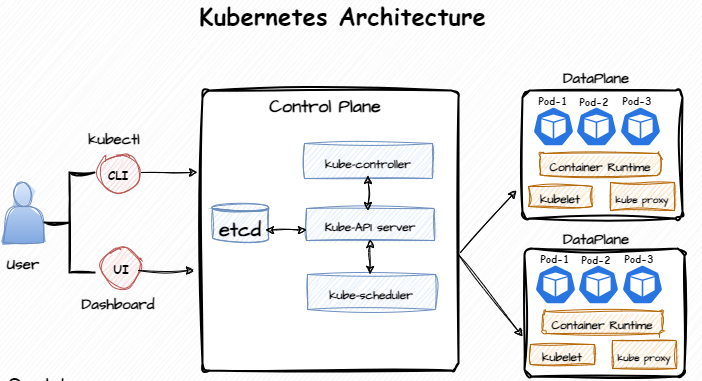
To write software that runs smoothly in a distributed system, developers should understand how the control plane communicates with worker nodes. You don't need to know how to install a control plane manually, but you must know how structural manifest parameters change into active compute boundaries on real machines.
When you pass a YAML file to the cluster using the kubectl command line interface, the system processes the request in distinct stages:
-
Validation and Storage: The master API server checks the incoming configuration syntax against open API schemas and writes the verified target state directly into the cluster's key-value datastore (
etcd). -
Scheduling Evaluation: The master scheduler reviews your resource declarations (like CPU demands, node selectors, or proximity constraints) and chooses the worker node best suited to run the container.
-
Local Container Execution: The
kubeletagent on the chosen node processes the instructions, requests the necessary images from the container runtime registry, mounts the specified volumes, and boots the application processes.
Pods and Deployments
The atom of the platform is the Kubernetes Pods primitive, which encapsulates one or more closely linked container processes. In actual production systems, developers rarely run standalone pods. Instead, they manage them via high-level controllers like Kubernetes Deployments to maintain desired state count and coordinate software updates.
Declarative Upgrades and Update Strategies
Deployments manage historical application versions through underlying ReplicaSets. Changing a configuration setting—like adjusting an environment flag or updating an image version—triggers a smooth, automated rolling update process.
The following deployment template shows how to configure a zero-downtime update using specific maxSurge and maxUnavailable parameters:
apiVersion: apps/v1
kind: Deployment
metadata:
  name: billing-service
  labels:
    app: billing-service
    layer: api
spec:
  replicas: 3
  strategy:
    type: RollingUpdate
    rollingUpdate:
      maxSurge: 1        # Provisions at most 1 extra container above baseline during rollouts
      maxUnavailable: 0  # Prevents existing workloads from shutting down until new ones are healthy
  selector:
    matchLabels:
      app: billing-service
  template:
    metadata:
      labels:
        app: billing-service
    spec:
      containers:
      - name: billing-api
        image: private-registry.io/finance/billing:v3.2.0
        ports:
        - containerPort: 8080
          name: api-port
Alternative Workload Controllers
While standard Deployments excel at hosting stateless microservices, other application types require different execution characteristics:
-
StatefulSets: Crucial for applications that require unique, stable network identifiers and persistent, sticky storage bindings across restarts (such as databases like PostgreSQL or Kafka brokers).
-
DaemonSets: Automatically run a single copy of a targeted pod across every single node in the cluster. These are ideal for operational infrastructure tasks like log collection (Flux) or security monitoring agents.
Services and Networking Topologies
Pods are short-lived. They receive unique internal IP addresses when initialized, but these IPs change whenever a pod restarts, fails a health check, or scales down. To give internal microservices or public web traffic a stable entry point, you must use Kubernetes Services.
Services use flexible label matching to automatically route incoming traffic to healthy, active pod endpoints.
Service Types and Routing Behavior
Kubernetes uses specific service patterns to handle network routing inside and outside the cluster:
-
ClusterIP: The default service type. It creates a private IP accessible only inside the cluster, protecting databases and backend tools from public exposure.
-
NodePort: Opens a designated port range (
30000-32767) across all cluster nodes, routing external traffic hitting that node port directly to internal application containers. -
LoadBalancer: Connects to cloud infrastructure APIs to deploy a public load balancer that directs external traffic straight to your cluster workloads.
apiVersion: v1
kind: Service
metadata:
  name: billing-service-entry
spec:
  type: ClusterIP
  selector:
    app: billing-service
  ports:
  - name: api-port
    port: 80
    targetPort: 8080
    protocol: TCP
ConfigMaps and Secrets
Hardcoding configuration files, database addresses, and API credentials directly into container layers complicates software lifecycle management. Kubernetes solves this by separating configuration states from executable files using ConfigMaps and Secrets.
Separating Environment State from Application Code
-
ConfigMaps: Manage plain-text configuration settings in key-value format. They can be injected into containers as environment properties, start arguments, or mounted as plain configuration files.
-
Secrets: Securely handle sensitive tokens, security keys, and passwords. Secret data is loaded into memory via
tmpfsmounts, keeping sensitive configurations off physical node disks.
apiVersion: v1
kind: Pod
metadata:
  name: processing-worker
spec:
  containers:
  - name: engine
    image: private-registry.io/apps/engine:v1.2.0
    env:
    - name: DB_PASS
      valueFrom:
        secretKeyRef:
          name: vault-secret
          key: password
    volumeMounts:
    - name: app-props
      mountPath: /app/properties
  volumes:
  - name: app-props
    configMap:
      name: runtime-config
Storage and Volumes
Containers are ephemeral; any files generated within a container’s root filesystem disappear the moment it crashes or restarts. To store application data permanently, developers must work with the platform's Kubernetes Storage sub-layers.
Persistent Volume Lifecycles
Kubernetes separates storage requests from physical disk provisioning using two key components:
-
PersistentVolume (PV): A piece of storage in the cluster that has been provisioned by an administrator or dynamically generated by a StorageClass. It represents a raw physical storage asset (like a cloud disk volume or a network file share).
-
PersistentVolumeClaim (PVC): A developer’s request for storage. It specifies size constraints and access patterns (such as
ReadWriteOnceorReadOnlyMany), allowing pods to consume storage resources abstractly without needing details about the underlying hardware.
Jobs and CronJobs
Not every backend service runs indefinitely as an active listener. Many production tasks—like processing batch files, running data migrations, or creating nightly reports—are finite operations that need to run until completion. For these workloads, Kubernetes provides Jobs and CronJobs.
Handling Finite Processes
-
Jobs: Coordinate a set of pod tasks until they complete successfully. If a container fails due to a code error or an underlying node drop, the Job controller automatically reschedules it until it reaches its successful completion target.
-
CronJobs: Automate Job executions using classic crontab timing syntax, which is ideal for regular maintenance tasks.
apiVersion: batch/v1
kind: CronJob
metadata:
  name: analytic-sync
spec:
  schedule: "0 1 * * *"  # Runs every single night at 1:00 AM
  failedJobsHistoryLimit: 1
  successfulJobsHistoryLimit: 2
  jobTemplate:
    spec:
      template:
        spec:
          containers:
          - name: sync-agent
            image: private-registry.io/ops/syncer:v1.0
            args:
            - /bin/sh
            - -c
            - "python process_metrics.py"
          restartPolicy: OnFailure
Health Checks
Distributed applications must gracefully handle slow starts, partial drops, and internal application deadlocks. If a container hangs or stops responding, the platform needs a built-in way to identify the state and fix the workload without human intervention. This self-healing architecture relies on three distinct health probes.
Liveness, Readiness, and Startup Interceptors
-
Startup Probe: Verifies if the containerized application has successfully initialized. All other diagnostic checks remain paused until this probe succeeds, preventing slow-starting legacy engines from getting stuck in restart loops.
-
Liveness Probe: Checks if the containerized application is running normally. If a service deadlocks or freezes, this probe fails, telling the node agent to restart the container.
-
Readiness Probe: Confirms if the application is ready to accept network traffic. If it fails, the service controller immediately routes traffic away from the pod, preventing users from encountering broken connections.
Troubleshooting
When a containerized system misbehaves, locating the root cause requires a systematic approach. Rather than guessing, you can use this structured diagnostic sequence to isolate cluster issues:
Step 1: Check Pod Status
Check the status of all workloads in the target namespace to find failing pods.
kubectl get pods -n target-space
Step 2: Inspect Event Logs
If a pod is stuck in a Pending, ImagePullBackOff, or CrashLoopBackOff loop, look at its event logs to find the underlying issue.
kubectl describe pod <pod-id> -n target-space
Step 3: Stream Application Logs
If the container runs but behaves incorrectly, stream the standard output log to inspect application errors and stack traces.
kubectl logs <pod-id> --tail=50 -f -n target-space
Step 4: Open an Interactive Diagnostic Session
For complex issues like network path tracing or verifying file paths, open an interactive shell inside the active container.
kubectl exec -it <pod-id> -n target-space -- /bin/sh
Curricular Domain Distribution
The exam maps across five specific structural competencies:
-
Application Deployment (20%)
-
Application Configuration (25%)
-
Architecture and Probes (20%)
-
Services and Networking (15%)
-
Troubleshooting (20%)
Practical Learning Roadmap
Mastering the CKAD requires a blend of hands-on practice, terminal speed, and an understanding of core cloud architecture patterns. Here is an actionable roadmap to guide your preparation:
-
Solidify Core Container Knowledge: Make sure you can comfortably package thin application footprints, manage local images, and verify multi-container ports using standard engines like Docker.
-
Learn to Navigate the Documentation: The exam allows candidates to look up syntax details in the official Kubernetes documentation. Practice searching for complex YAML structures, like network policy definitions or volume configurations, to save time during the test.
-
Optimize Your Terminal Configuration: Save time during the exam by setting up shell shortcuts. Configure helpful aliases like
alias k=kubectland initialize standard tab autocomplete features immediately when the exam begins. -
Use Imperative Generators: Avoid writing raw configuration text from scratch. Use imperative commands combined with
--dry-run=client -o yamlflags to auto-generate baseline files, then add advanced properties manually. -
Leverage Structured Educational Tracks: Supplement your hands-on terminal practice with expert-led training programs. Enrolling in comprehensive courses, like the deep-dive training programs provided by DevOpsSchool, gives you access to structured modules, live scenario labs, and practice exams designed around the official CNCF curriculum guidelines.
Common Developer Mistakes
Even experienced developers can hit predictable speed bumps when shifting applications into live clusters. Spotting these anti-patterns early helps keep your workloads steady.
-
Running Standalone Pods: Deploying bare pods outside of a Deployment means the cluster cannot reschedule them if a node goes down, leading to unnecessary downtime.
-
Relying on Unpinned Image Tags: Using the
:latesttag introduces instability to your system. If a container restarts and pulls an unverified image version, it can cause runtime failures that are difficult to trace. -
Missing Health Probes: Leaving out liveness and readiness checks leaves the control plane blind to application health. If an application locks up, Kubernetes will continue routing user traffic to the broken pod instead of restarting it.
-
Running Commands in the Wrong Context: Executing changes in the wrong cluster namespace can lead to accidental production adjustments. Always verify your active workspace by running
kubectl config current-contextbefore making changes.
Career Opportunities
Earning a CKAD certification demonstrates that you can build, deploy, and debug applications inside distributed systems. It proves your proficiency with industry-standard, cloud-native development practices.
This skill set opens doors to several core modern roles:
-
Cloud Native Developer: Architecting scalable microservices architectures designed specifically for modern cloud environments.
-
Platform Engineer: Building internal developer platforms (IDPs), designing automated pipelines, and improving application delivery infrastructure.
-
Site Reliability Engineer (SRE): Monitoring complex clusters, maintaining system availability, and automating recovery procedures for high-scale applications.
Future Trends
The cloud-native landscape is increasingly focused on reducing developer friction. While understanding low-level cluster primitives remains critical, the tooling is evolving to abstract away repetitive configuration tasks.
Key trends shaping the future of application development include:
-
Platform Engineering Adoption: Engineering organizations are shifting toward internal platforms that handle complex cluster management behind clean self-service interfaces, allowing developers to deploy applications without editing raw manifests.
-
Standardized App Packaging: Packaging applications using Helm charts and Kustomize setups has become the industry norm, simplifying how teams configure and version applications across multiple staging targets.
-
Intelligent Autoscaling Systems: Systems are moving toward event-based autoscaling tools like KEDA, which dynamically scale container footprints based on processing queues or message volumes, even scaling workloads down to zero to optimize cloud spend.
Frequently Asked Questions
Is the CKAD exam entirely composed of multiple-choice questions?
No. The CKAD is a fully practical, performance-based test. You do not answer multiple-choice questions; instead, you interact with live cluster environments via a terminal to resolve real-world deployment challenges.
For how long does a CKAD certificate remain active?
The certification is valid for exactly 3 years from the date you pass. To maintain your status, you must pass the exam again before the expiration window closes to confirm your skills against the latest platform updates.
Do I need to be a cluster administrator to pass the CKAD?
No. The CKAD focuses on application development workflows rather than cluster management. While you need to be comfortable with container lifecycles and kubectl, you do not need experience bootstrapping nodes or configuring system etcd stores.
What distinguishes a ConfigMap from a Secret primitive?
ConfigMaps store non-sensitive configuration data in plain text, whereas Secrets handle sensitive information like encryption keys and passwords. Secrets are stored securely in the cluster and mounted into containers using volatile memory paths so they don't sit on physical hard drives.
What causes a container to throw a CrashLoopBackOff error?
This error status indicates that the container boots up successfully but terminates shortly afterward. Common causes include unhandled application runtime crashes, missing environment parameters, or incorrect file permissions. You can inspect previous container logs using kubectl logs <pod-name> --previous to find the exact stack trace.
Am I permitted to use the official documentation during the test?
Yes. Candidates are permitted to open the official online Kubernetes documentation pages during the exam session. However, you must navigate quickly to ensure you complete all tasks within the 2-hour limit.
Conclusion
Mastering application development on Kubernetes is a continuous process of shifting from local code design to distributed systems architecture. Developing a clear understanding of fundamental primitives like Pods, Deployments, and Services allows you to build highly resilient, self-healing applications that run reliably in production environments.
The Certified Kubernetes Application Developer (CKAD) framework provides a clear, structured roadmap to mastering these cloud-native competencies, helping you progress from writing simple containers to architecting enterprise distributed platforms.