
Slack helps teams communicate, share updates, and coordinate work. But when customer conversations happen over the phone, important details can remain outside the team's shared workspace. Leads may lack context, qualification can vary between employees, and follow-ups may be delayed while someone manually updates records or notifies the right person.
Integrating AI voice automation with Slack can help connect customer conversations with team communication and follow-up workflows. Letstawk is designed to support this process by capturing relevant conversation details, organizing outcomes, and connecting configured voice workflows with business tools.
Why Connect an AI Voice Agent to Slack?
Slack is useful for coordinating work, but conversations alone do not guarantee that the right information reaches the right people at the right time. A configured integration can help make relevant call outcomes available to teams so they can decide what to do next.
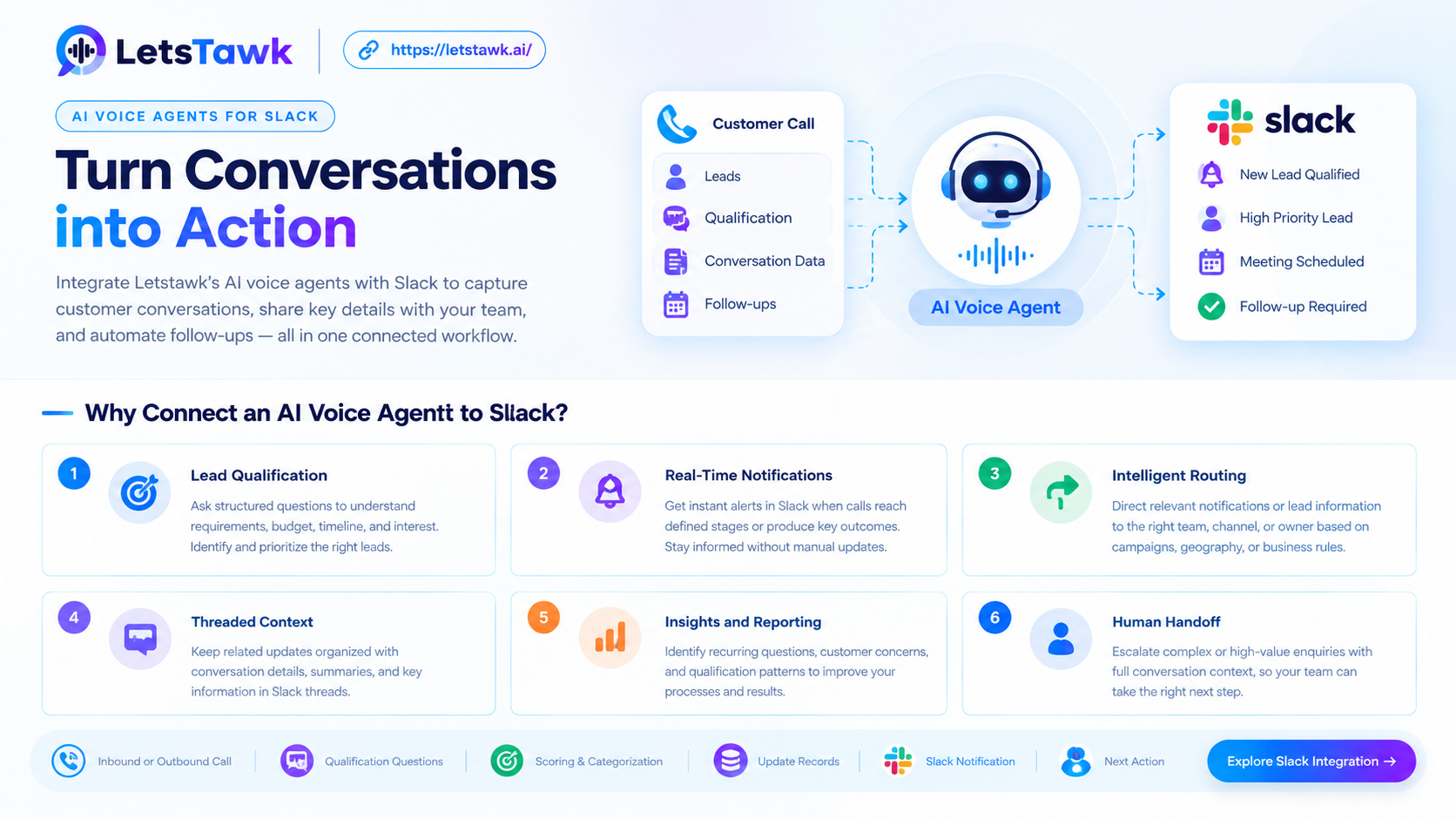
The Letstawk Slack integration overview highlights six areas where voice automation may support team workflows.
1. Lead Qualification
An AI voice agent can ask structured questions to understand a prospect's requirements, budget, timeline, or level of interest. Configured qualification criteria can help categorize the enquiry and identify which leads need additional attention.
2. Real-Time Notifications
When a call reaches a defined stage or produces a relevant outcome, a configured workflow may send a notification to a designated Slack channel. This can help team members see important updates without relying solely on manual messages.
Actual notification timing depends on the integration, event processing, and connected systems.
3. Intelligent Routing
Different enquiries may need different responses. A high-priority sales opportunity may require immediate attention, while a routine question can follow a standard process.
Configured rules can help direct relevant notifications or lead information to the appropriate team, channel, or owner, where the connection supports these actions.
4. Threaded Context
A notification is more useful when team members can understand the conversation behind it. Letstawk's integration overview highlights threaded context to help keep related updates organized.
The exact information available in Slack depends on the configured workflow and supported message features. Businesses should confirm whether the integration sends summaries, qualification details, links, or other call information.
5. Insights and Reporting
Conversation outcomes can help teams identify recurring questions, customer concerns, and lead qualification patterns. Where reporting data is available, teams can use these insights to review their processes and identify opportunities for improvement.
Slack notifications should not be confused with a complete analytics system. Detailed reporting may depend on Letstawk's available analytics features or other connected tools.
6. Human Handoff
Not every enquiry should be handled entirely by automation. Complex questions, sensitive issues, and high-value opportunities may require a human representative.
A configured handoff workflow can notify the appropriate team and share available conversation context, helping employees decide how to continue. The escalation rules and information transferred should be tested before deployment.
From Call to Slack Notification: How It Works
A typical workflow can follow six steps:
-
Inbound or outbound call: An AI voice agent handles an inbound conversation or initiates an eligible outbound call.
-
Qualification questions: The agent gathers relevant information according to the configured conversation flow.
-
Scoring and categorization: Supported rules classify the conversation by lead type, interest, or priority.
-
Record and outcome updates: Call details are sent to configured destinations, such as a supported CRM or lead-management system.
-
Slack notification: A configured integration sends the relevant outcome to a designated channel or thread.
-
Next action: The team reviews the update and coordinates a follow-up, assignment, or escalation through the available workflow.
This is an illustrative process, not a guarantee that every step is enabled by default. Slack primarily supports team communication; persistent lead records, scheduling, campaign management, and task creation may depend on connected applications and separately configured workflows.
Preparing Your Slack Integration
Before launch, define the events that should trigger notifications, the channels that should receive them, and the information each message should contain. Confirm connection permissions, routing rules, duplicate-event handling, failed deliveries, and escalation procedures. Test the workflow with realistic calls before expanding its use.
Before enabling outbound AI calls or call recording, check the requirements that apply to the caller, recipient, and campaign. Obtain any required consent and provide required disclosures. Configure calling permissions, recording settings, opt-out handling, and access to customer data accordingly. Requirements vary by jurisdiction and use case; confirm the setup with your compliance or legal adviser.
Try Letstawk for Slack
Want to connect AI-powered conversations with your team's communication workflow? Explore Letstawk's Slack integration to review the available capabilities and configuration options. Try Letstawk with a defined use case and test how call outcomes can reach the right people with useful context.