
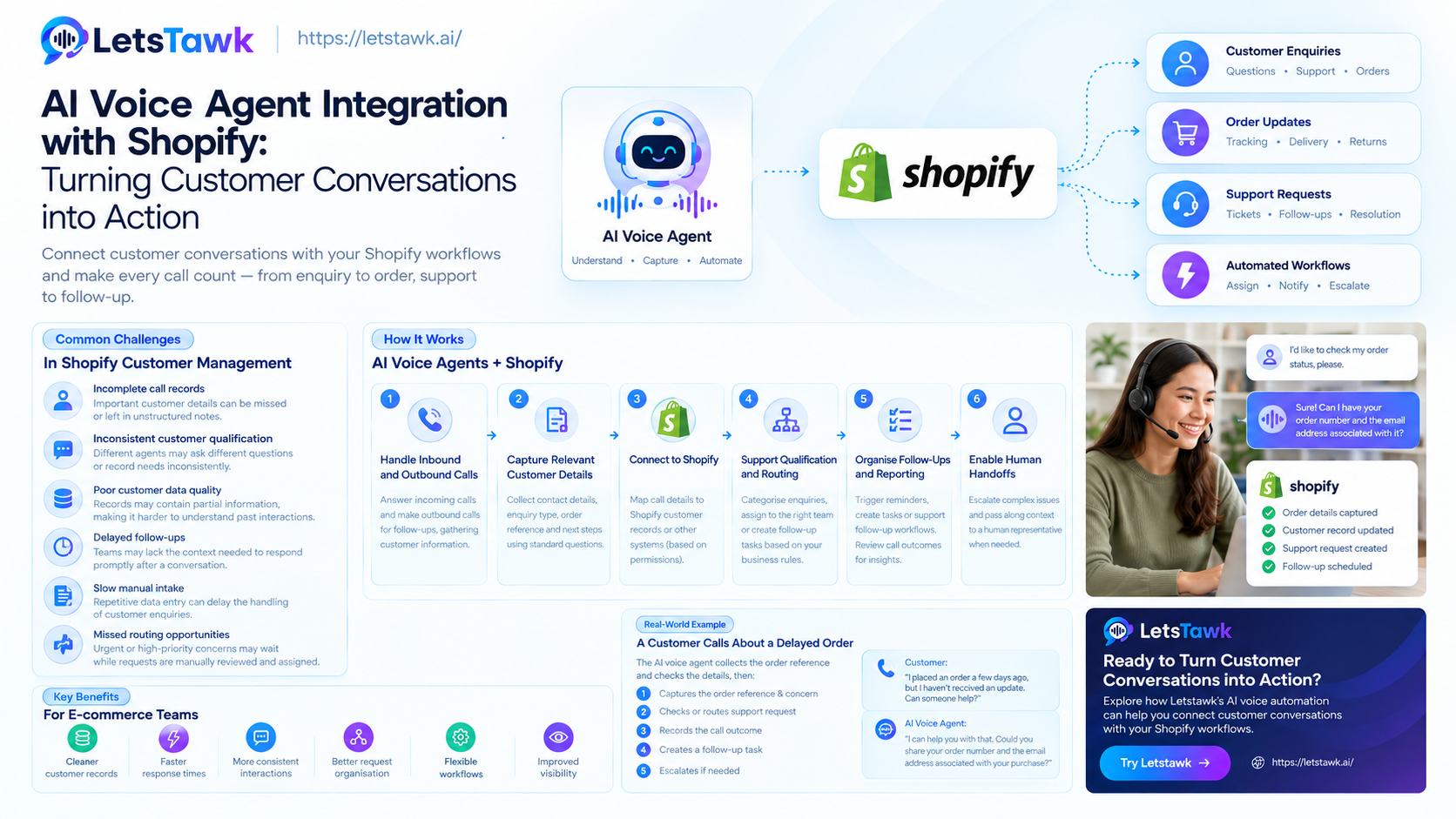
E-commerce businesses handle customer enquiries, product questions, order-related concerns, and follow-ups every day. As customer volumes increase, managing these interactions manually can lead to incomplete records, delayed responses, and repetitive administrative work. Integrating an AI voice agent with Shopify-related workflows can help businesses organise customer conversations and make relevant information easier for their teams to use.
Common Challenges in Shopify Customer Management
Customer information is valuable only when it is captured accurately and acted upon. Without a well-connected process, e-commerce teams may face several challenges:
-
Incomplete call records: Important customer details can be missed or left in unstructured notes.
-
Inconsistent customer qualification: Different agents may ask different questions or record customer needs inconsistently.
-
Poor customer data quality: Customer records may contain partial information, making it harder to understand previous interactions.
-
Delayed follow-ups: Teams may lack the context needed to respond promptly after a conversation.
-
Slow manual intake: Repetitive data entry can delay the handling of customer enquiries.
-
Missed routing opportunities: Customers with urgent or high-priority concerns may wait while requests are manually reviewed and assigned.
These challenges can affect both customer support and sales. An AI voice agent can help standardise information gathering, while a suitable integration can connect that information to the systems teams use.
How AI Voice Agents Can Support Shopify Workflows
1. Handle Inbound and Outbound Conversations
An AI voice agent can help manage incoming customer calls and, where supported and configured, make outbound calls for follow-ups. It can gather information about a customer's needs, such as a product enquiry or an order concern.
2. Capture Relevant Customer Details
During a conversation, the agent can collect details such as contact information, the reason for the call, an order reference, and the customer's requested next step. Standardised questions can help make this information more consistent.
3. Connect Information to Relevant Systems
With a supported Shopify integration or connector, selected customer and conversation details may be mapped to appropriate records or connected applications. The exact data that can be read or updated depends on the integration method, permissions, and configured field mapping. Avoid assuming every call automatically updates every Shopify record.
4. Support Customer Qualification and Routing
Businesses can define rules for categorising enquiries and directing them to the appropriate team. For example, a product question may go to sales, while a delivery complaint may need customer support. Routing based on customer intent or enquiry type requires the relevant rules and workflow actions to be configured.
5. Organise Follow-Ups and Reporting
Where the connected systems support the required actions, conversation outcomes can be used to trigger reminders, create tasks, or support follow-up workflows. Reviewing call outcomes can also help teams identify recurring questions and service issues.
6. Enable Human Handoffs
AI voice agents are not a replacement for human judgement in every situation. Complex complaints, payment disputes, and enquiries requiring detailed investigation may need a human representative. A well-designed workflow should make escalation straightforward and pass along the information already collected.
Practical Customer Call Example
Imagine a customer calls an online store and says:
Customer: “I placed an order a few days ago, but I haven't received an update. Can someone help?”
The AI voice agent asks for the customer's order reference and the necessary identifying details. It then follows the configured workflow.
-
Capture: Record the order reference and the delivery-related concern.
-
Check or route: If the integration supports access to the relevant order information, the workflow may retrieve it. Otherwise, the request can be passed to a support representative.
-
Record: Save the call summary in the configured system, if supported.
-
Follow up: Create a task or initiate a follow-up process if the necessary automation is enabled.
-
Escalate: Send the case to a human when further investigation is required.
This example illustrates a possible workflow, not a guarantee that every action is available out of the box. The actual process depends on the connection, permissions, and automation rules.
Benefits for E-commerce Teams
A properly configured voice automation workflow can help businesses work toward:
-
Cleaner customer records through structured information capture.
-
Faster response processes by reducing avoidable manual steps.
-
More consistent interactions through standardised questions.
-
Better request organisation with configured routing and follow-up rules.
-
Flexible workflows that can adapt to store processes and customer-service priorities.
-
Improved visibility into customer concerns when conversation outcomes are recorded consistently.
Results will depend on integration quality, the accuracy of captured information, and how teams manage exceptions.
Explore AI Voice Automation with Letstawk
Letstawk helps businesses explore AI voice automation for customer conversations and connected workflows. Visit Letstawk to learn how its AI voice agent approach may fit your e-commerce operations. Try Letstawk to explore ways to organise customer calls, reduce repetitive administrative work, and build a more consistent process for handling customer enquiries and follow-ups.
How can an AI voice agent help Shopify businesses improve customer data management, automate follow-ups, and streamline customer support?