
Adobe Commerce Cloud is an automated software placement platform with cloud infrastructure. The platform is designed to develop ecommerce projects with large volume of transactions. Our experience shows that it is more than 200 thousand units of goods.

What differentiates Adobe Commerce Cloud from Adobe Commerce?
-
It is about cloud infrastructure. This Adobe product is a comprehensive business solution with built-in Amazon Web Services hosting. Experts predict that cloud hosting is the future of hosting web companies. The average annual growth rate will be 18,3%. Large-scale business is increasingly choosing cloud services in contrast to local hosting. Amazon Web Services ranks second place in the world among other cloud services.
-
Adobe Commerce Cloud includes a lot of utilities that will improve business performance: Redis cache for faster page loading and RabbitMQ, an application that loads the queue system. In other words, the operations, e.g., saving, updating, and adding orders, will not overload your site. It will work without problems. Cloud infrastructure uses a Fastly service to cache sites, pages, resources, a CSS, or protect sites and networks from harmful traffic and attacks. Using the New Relic service to view and analyze data is also possible.
-
Unlike Adobe Commerce, the Adobe Commerce Cloud platform provides round-the-clock real-time support from the Adobe team. This support is covered by a Service Level Agreement (SLA). Thus, if there is a problem with the project at night, Adobe support will ensure its smooth, uninterrupted operation.
Update on Adobe Commerce Cloud
Our company develops and implements global ecommerce projects. Adobe Commerce Cloud upgrade for projects is a frequent request from our clients.
The most prior thing business owners are concerned at upgrading terms. The terms depend on the current Magento version along with the version the developer wants to upgrade the site. Of course, it is better to upgrade it regularly. Then the full functionality will be easier and faster to update. It also takes into account the volume of custom development that needs updating.
The upgrade process consists of several stages.
First, you must install the project locally with all the latest changes to the production environment. If the project has multiple websites or pages, it is better to expand all of them to understand the site structure. It is crucial to see how a site works before upgrading. Only then start the upgrading process.
The next step is to determine which services should be updated to support the latest version of Magento.
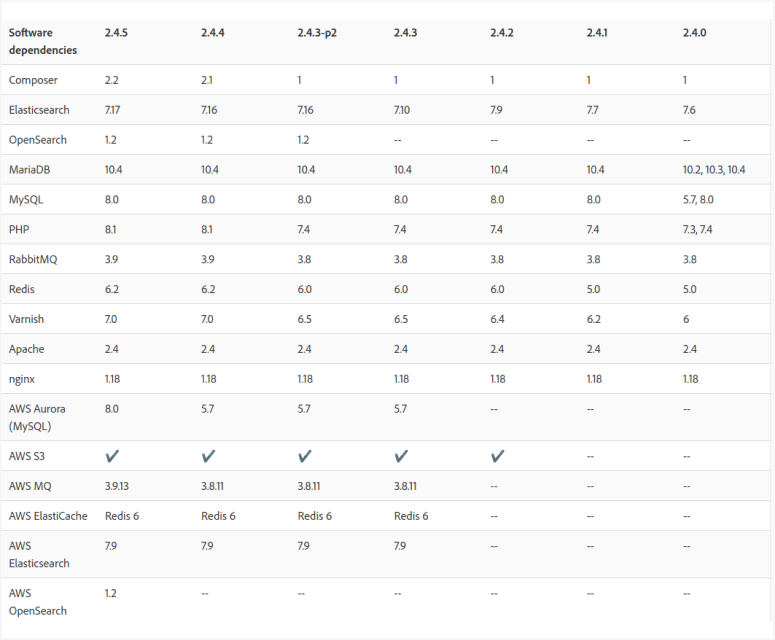
You need to update the magento/magento-cloud-metapackage. It is specified in the project root in the composer.json file. A good solution is to change the dependencies in composer.json according to the Magento version you planned to upgrade to. You can find the versions that have been released on GitHub. Then, if you are using Composer 2, you must run the composer update command.
Next, we go to edit custom modules that are in the app/code directory. After the update, you should check whether frontend works or the custom modules "broke" the site. It includes:
-
removing @deprecated methods
- replace helper classes with ViewModel
- search and possible replacement of all preference
- searching and possible replacement of around plugin
- compatibility study with php8.1 (or version required for new Magento)
- possible replacement of business logic
- removing modules that are no longer used or carry any value
- and other standards described here. Programming Best Practices | Adobe Commerce Developer Guide
Additionally, we recommend checking the theme files from app/design directory because they can overwrite an old function or a non-existent file. Then you should test the whole site functionality to search for bugs, style problems, or themes. And the final stages are deployed to the stage and deployed to production. Of course, you must run all existing Autotests, Unit Tests and complete regression testing to ensure everything went well.
Why a regular update is a must?
Adobe Commerce Cloud is an excellent product for a large-scale business that operates a significant turnover of goods. Therefore, the upgrade is the same indispensable technical process as the growth of this business. Regular updates ensure that the site is safe and functional, therefore it:
- minimizes risks with support from Magento
- minimizes the risk of supporting modules from other vendors
- minimizes the risks of hacking, cyberattacks, or simply unstable website operation
- opens the possibility of updating the page design